



What Is Print-Ready Artwork?
Print-ready artwork is a finished file. Every word, logo and number is already on it, exactly as it should print, and it’s set up at the right size, with bleed, in print colours. We check it, email you a proof, and print it as it is.
An AI picture of a card, your logo and an email saying “please add the following wording” is something else. It’s a design brief: everything a designer needs to make your artwork, but not the artwork itself. This page shows the difference, and what happens to each.
The short versionIf nothing is left to design, type or lay out, it’s print-ready artwork, and we check it free. An AI image costs £10 +vat or £29 +vat to make print-ready, depending on the work involved. A logo and a list of wording is a job for our Design Service, at £29 +vat.
What print-ready artwork is
Print-ready artwork is a file we can print without designing anything. Every decision has already been made: where each word goes, the font, the size and colour of each line, and what goes on the front and the back. The file only needs checking, not making.
- The right size. 92 x 60mm: the 86 x 54mm card plus 3mm of bleed on every side.
- Background into the bleed. The colour runs past the card edge, so no white line shows when the cards are cut.
- Everything inside the safe area. Wording, logo and numbers sit at least 3mm in from the card edge.
- Real text. Typed in a font, spelled the way you want it, with the font embedded or outlined.
- Your own logo, sharp. A vector logo, or one with enough pixels for 600dpi.
- Print colours. Set up in CMYK, the inks a press uses, not the RGB of a screen.
The front and back go as separate pages or separate files. PDF is best. Our artwork setup guide covers each point in detail, and our bleed and size help draws the template out.
- Size: 92 x 60mm, or at least 2173 x 1417 pixels.
- Resolution: 600dpi at that size, or vector.
- Colour: CMYK.
- Bleed and safe area: background to the edge of the bleed, everything important 3mm inside the card edge.
- Wording: all of it on the design, final and checked.
- File: PDF, AI, EPS, PSD or TIFF, with fonts embedded or outlined.
What isn’t print-ready artwork
These are the things we’re most often sent as “the artwork”. Every one is useful, because it shows a designer what you want. None of them can be printed as it is.
Sent together, these make a design brief. That’s fine: turning a brief into artwork is what our Design Service is for.
Why an AI visual concept isn’t print-ready
AI image tools are good at showing what a card could look like. What they make is a picture of a card, not artwork for one. It looks finished, which is why it’s so often sent as the artwork.
- It’s a picture of a card. The card is at an angle, lit, and lying on a table. Print it and you print the table.
- The edges are drawn in. The corners, shadow and shine are part of the picture. There’s no bleed, just tabletop.
- The text is drawn, not typed. Letters are shapes in the picture, so none of it can be edited. If the AI gets a spelling wrong, it can’t be corrected.
- Details change. This card offers the 10th coffee free and has nine stamps. AI tools don’t count.
- Your logo is redrawn. The AI makes its own version: close at a glance, but not your logo.
- Things appear. A QR code nobody asked for, which looks real and won’t scan.
- It’s a small screen image. 1024 x 1024 pixels, square and RGB. A card needs at least 2173 x 1417 pixels, in CMYK.
Drawn letters and real type
This is the fault that matters most. Text in an AI image is part of the picture, like the table. Text in print-ready artwork is real type, which a designer can change in seconds. We won’t print text taken from an AI image, because we can’t correct it.
AI concepts customers have sent us
Each of these looked finished, and each needed work before it could be printed. All four are pictures of cards: three lying on a surface, one standing on a table in front of a window.
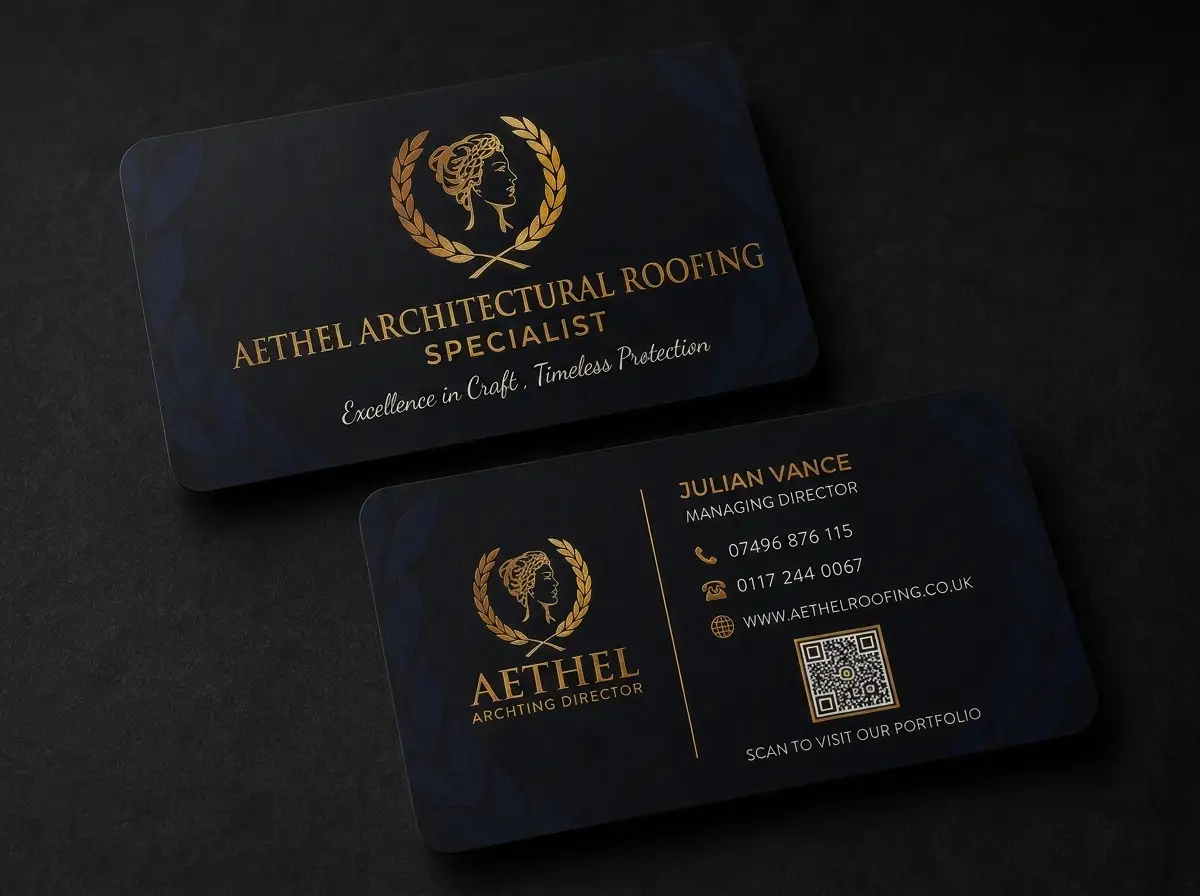
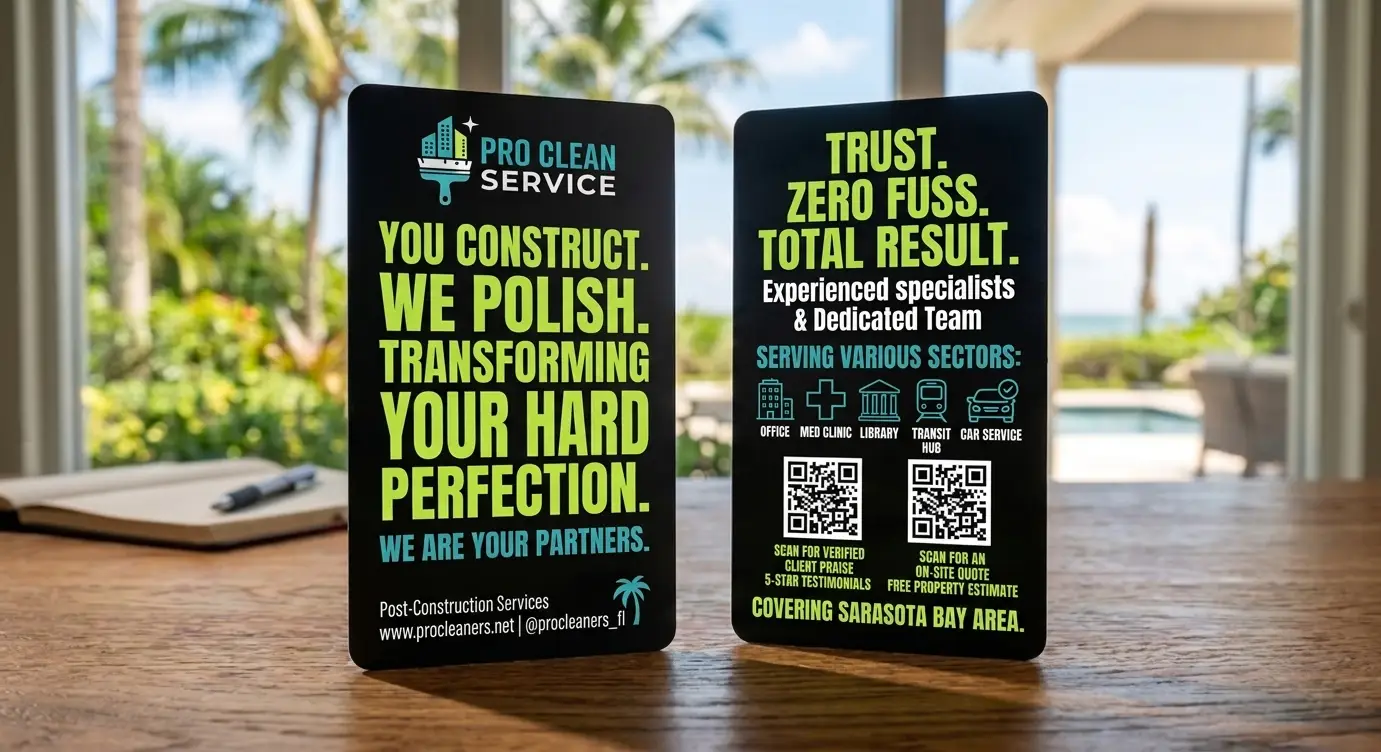
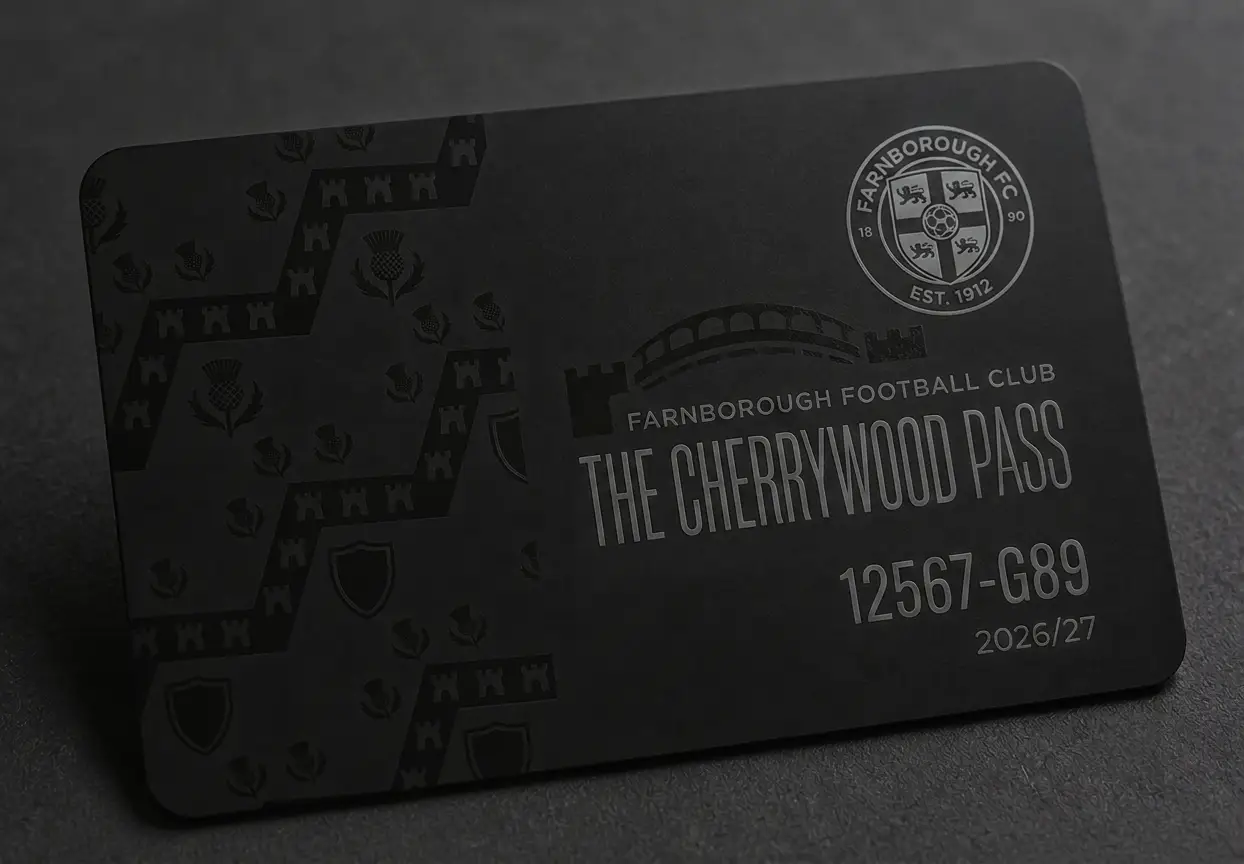
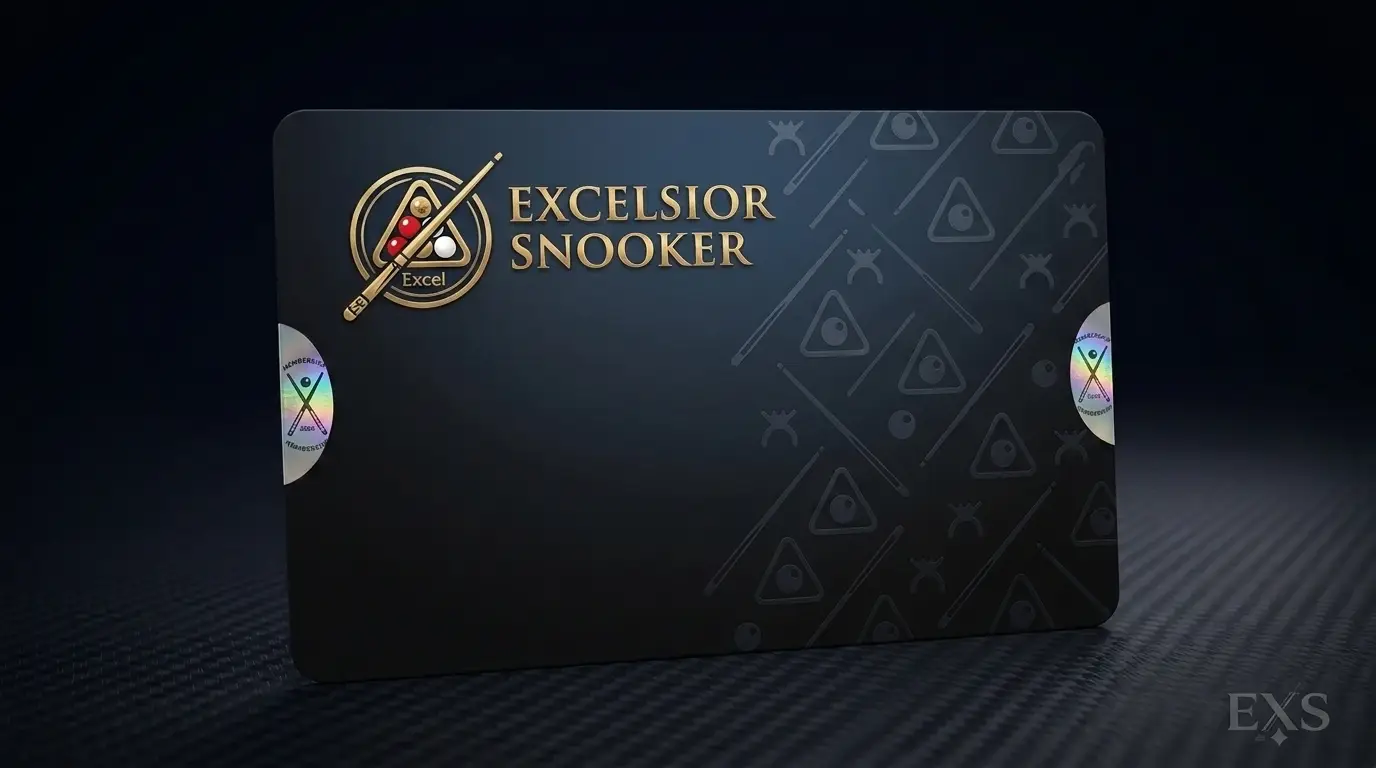
None of this means don’t use AI. An AI image is a very good brief: it shows us the look you want, and our designers build artwork to match. Making AI artwork print-ready costs £10 +vat or £29 +vat, depending on how much work it needs, and we’ll tell you which before we start. See thirty-five AI designs we’ve been sent, or our guide to using AI to design your card for an AI image that’s easier to work from.
Why a logo and “please add this wording” isn’t print-ready
This is the other brief we’re sent every day: a logo attached to an email, and a list of what the card should say.
The email has the ingredients, but not the recipe. Before anything can be printed, someone has to decide which way round the card goes, where the logo sits and how big it is, which font each line is in and at what size, which colours to use, what goes on the front and what goes on the back, and how to fit all of it inside the safe area.
Each of those is a design decision, and making them is design work. That’s what our Design Service does, for £29 +vat, with no limit on reasonable amends.
The logo matters too
Whoever builds your card can only use the logo you send. Here is our own logo, three ways logos reach us.
Ask whoever designed your logo for the original file, usually an AI, EPS or PDF. Our page on high resolution artwork explains why the size of the file matters, and raster v vector explains why a vector logo is best.
Which have you got?
Whatever you send, it goes one of four ways. Start at the top.
- What are you sending us?
- Is it an AI image of your card?If yes: We make it print-ready£10 +vat or £29 +vat, depending on the work
- If not: Does the design still need making, from a logo, wording, a sketch or a photo?If yes: Design Service£29 +vat. We build the artwork.
- If not: Is the size, bleed, resolution or colour mode wrong?If yes: Free artwork checkFix it yourself free, or we fix it for £10 +vat
- If not: It’s print-readyFree check, then your free proof
| What you send | What it is | What happens | Artwork cost |
|---|---|---|---|
| A finished file, set up as above | Print-ready artwork | We check it, then email you a free proof to approve. | Nothing |
| A finished design that’s the wrong size, has no bleed or is in RGB | Nearly print-ready | We tell you what’s wrong. You correct it, or we do. Then your free proof. | Free if you correct it, £10 +vat if we do |
| An AI image of your card | An AI concept | We look at it and tell you which price applies. Our designers make it print-ready and email you a free proof. | £10 +vat or £29 +vat, depending on the work involved |
| A logo and wording, a sketch, a photo of an old card or a Word file | A design brief | Our designers build the artwork and email you a free proof. Changes until you’re happy. | £29 +vat |
More on the two services: our artwork checking service and our Design Service.
Sending us a brief? Here’s what helps
A clear brief gets you a good first proof. Put these in your email:
- Your logo, in the best version you have: the original file, or the largest PNG or JPG you can find.
- Your wording, typed into the email, not in a picture. Copy it from somewhere you’ve already checked.
- Which wording goes on the front and which goes on the back.
- Your colours, if you have brand colours. CMYK values are best.
- The look you’re after: your AI image, a sketch, an old card, or an example from our site you like.
- Numbers and barcodes: a start number, or an Excel file with one row per card.
- The card type and quantity, and any extras such as a signature strip or a magnetic strip.
Then you check the proof
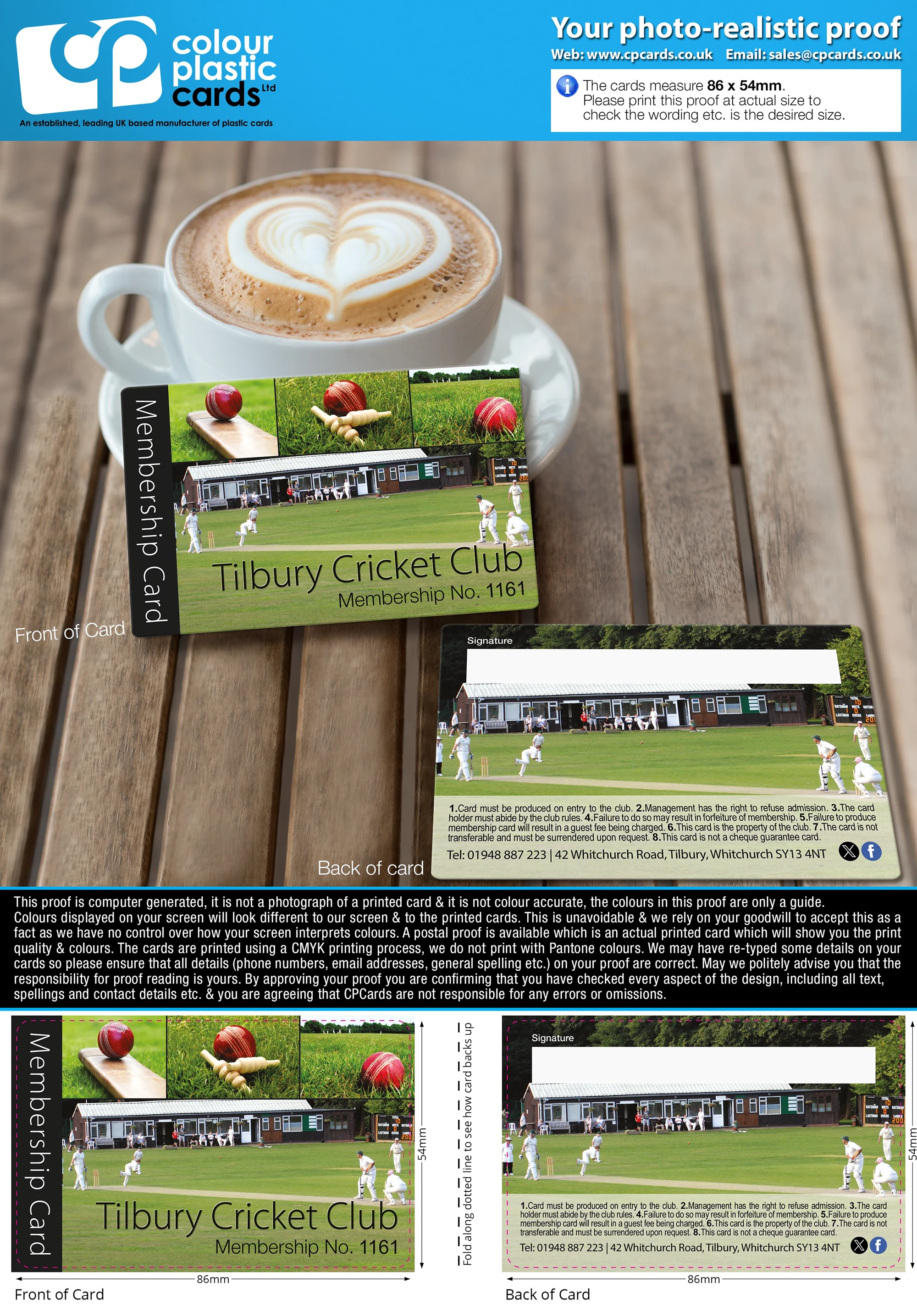
Whichever way your artwork comes to us, you get a free photorealistic proof by email before anything is printed. It shows the front and back of your card, and the artwork laid flat with its measurements.
Read every word, number and web address on it. We set your wording exactly as you send it, and our checks are technical, not proofreading. When you approve the proof, you’re confirming everything on it is right.
If colour matters, you can add a postal proof for £65 +vat: printed cards posted to you before the full run.
At CP CardsOur designers are in-house, and designing for plastic cards is all they do. Making AI artwork print-ready is £10 +vat or £29 +vat, depending on the work involved. Designing your card from your logo and wording is £29 +vat.
Questions & Answers
-
What does print-ready artwork mean?
A finished file we can print as it is, with nothing left to design or type. It’s 92 x 60mm (the 86 x 54mm card plus 3mm of bleed all round), 600dpi or vector, in CMYK, with every word, logo and number in place inside the 3mm safe area and the fonts embedded or outlined.
-
Is an AI-generated image print-ready artwork?
No. It’s a picture of a card, usually at an angle with a shadow, at screen resolution and in RGB, and its text is drawn as part of the picture, so it can’t be edited. It’s a useful guide to the look you want, and our designers can make print-ready artwork from it for £10 +vat or £29 +vat, depending on the work involved.
-
How much does it cost to fix AI artwork?
£10 +vat or £29 +vat, depending on how much work it needs. We look at the file first and tell you which before we start. Either way you get a free email proof to approve.
-
I’ve sent my logo and the wording. Isn’t that the artwork?
It’s a brief. Someone still has to decide the layout, the fonts, the size of each line, the colours, and what goes on the front and the back. That’s design work, which our Design Service does for £29 +vat, with no limit on reasonable amends.
-
What if my file is nearly print-ready?
We check every file free. If something technical is wrong, such as the size, the bleed or the colour mode, we tell you what and why. You can correct it and send it again at no charge, or we’ll put it right for £10 +vat. See our artwork checking service.
-
Do you check the spelling of my wording?
No. Our artwork check is technical: size, bleed, resolution, colour and how the file is set up. We set your wording exactly as you send it, and you check every word and number on your free email proof before you approve it.
-
What’s the best file format to send?
PDF, with the fonts embedded. We also take AI and EPS files with the fonts outlined, and PSD or TIFF at 600dpi in CMYK. Word and PowerPoint files can’t be used for print. More in which file format to send.
-
What’s the best version of my logo to send?
The original file from whoever designed it, usually an AI, EPS or PDF file. Failing that, the largest PNG or JPG you have. A logo saved from a website, cut from an email signature or photographed on paper prints blurred.
Not sure which you’ve got?
Send us whatever you have, as it is: a finished file, an AI image, or a logo and a list of wording. We’ll tell you whether it’s print-ready, needs a fix, or is a brief for our designers, and what that costs, before any work starts.
Email sales@cpcards.co.uk. We aim to reply within 10 minutes, 9am to 5pm, Monday to Friday.