



How to Send Your Gift Card Codes in an Excel or CSV File
A gift card with a scratch-off panel carries two numbers. The secret code is printed under the panel, where nobody can read it until the card is scratched. A small serial number is printed where it can always be seen, so you can tell which card is which without spoiling it.
Both come from one spreadsheet that you send us, with a row for every card: the serial number in column A and the secret code in column B. This page shows how to lay that file out, how to stop Excel quietly changing your numbers, and how to use your copy of the file to find any card's code later.
The short versionOne row per card. Serial numbers in column A, secret codes in column B, headings in row 1, and nothing else in the file. Format both columns as Text before you paste anything in. Send it as an Excel or CSV file attached to an email, and keep a copy: it's the only record of which code is on which card.
Two numbers, two jobs
The secret code is what the card is worth. Whoever has it can spend the card, which is why it sits under a scratch-off panel: a code printed in the open on a card in a display rack is a code anyone can photograph.
The serial number is for you and your staff. It identifies the card without giving anything away, so it can be printed in plain sight. When a customer says their code won't work, or a card goes missing before it's sold, the serial number tells you which card it is, and your copy of the file tells you which code is under its panel.
Where they go on the card
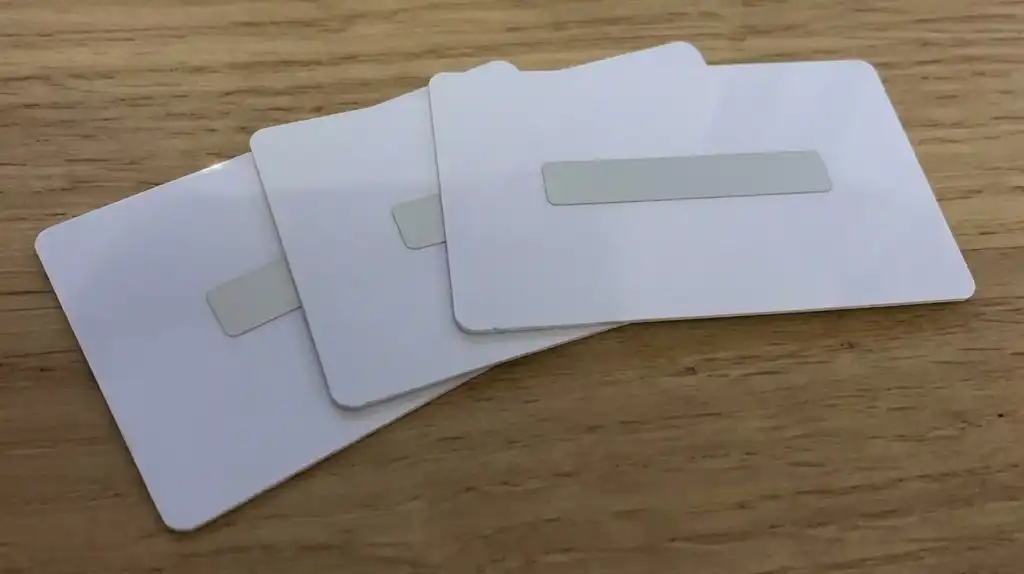
- The panel can be most sizes. A typical panel is 8mm x 75mm, and it has to stop at least 4mm from the edge of the card.
- Nothing can be printed on the panel itself, so the instruction, such as “Scratch to reveal your code”, goes beside it.
- A card can have more than one panel. Each panel's wording needs a column of its own in the file.
- The serial number can go anywhere on the card, front or back, at any size. It's normally set in Arial or Times New Roman, and it can be printed in any CMYK colour, including one matched to your logo.
Scratch-off panels are not available on EcoTough plastic cards or Plastic-Free Board cards.
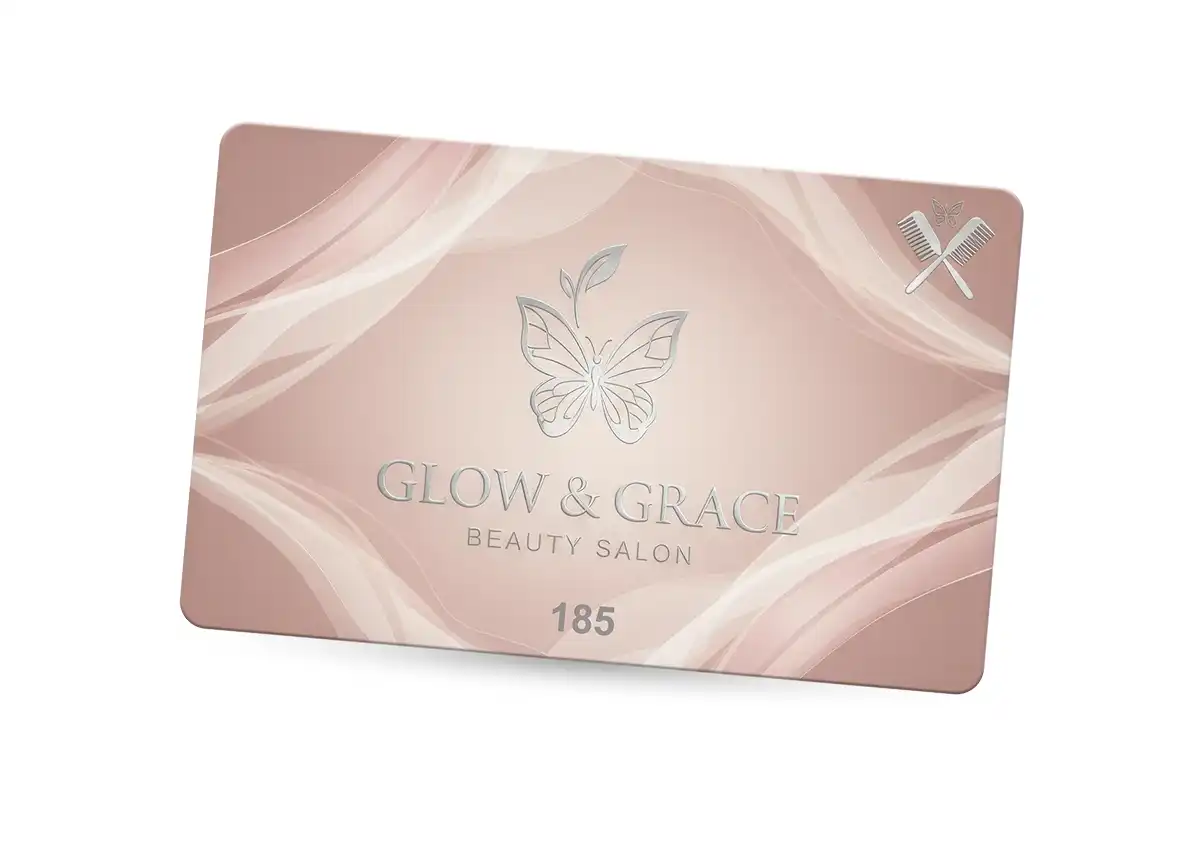
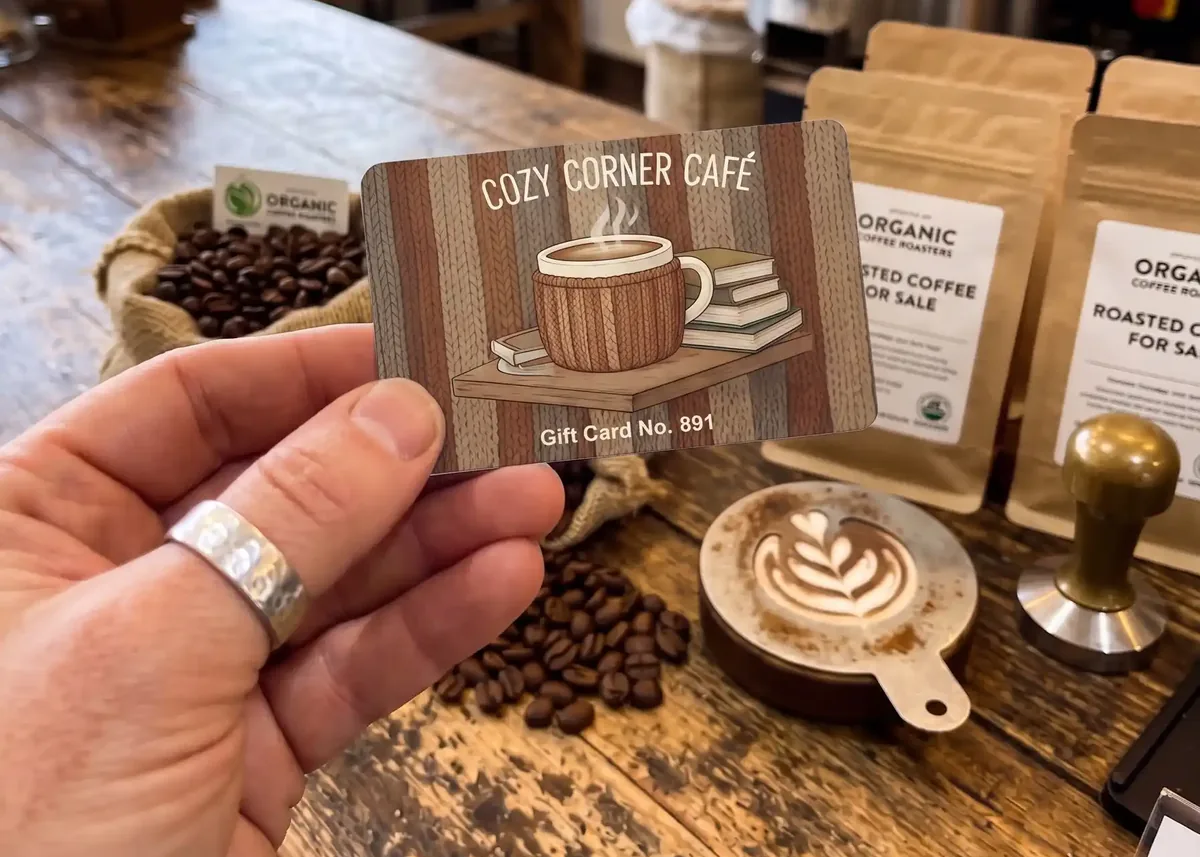
Two ways to show the serial number on a gift card design: small and quiet at the foot of the card, or as part of the design, as on the café card.
1One row per card, two columns
Put the headings in row 1 and start the cards in row 2. Column A is the serial number and column B is the secret code. Every row after that is one card, so 250 cards need 250 rows of numbers, from row 2 down to row 251.
| Row | A | B |
|---|---|---|
| 1 | Serial number | Secret code |
| 2 | 000101 | 4QGK-X3PN-CRHC |
| 3 | 000102 | 3PW7-N3QF-FT7N |
| 4 | 000103 | MWFJ-TQC3-9QNJ |
| 5 | 000104 | 4GR6-D4TC-RQX4 |
| ⋮ | ⋮ | ⋮ |
| 26 | 000125 | 4VGK-9YK7-WC9T |
- Serial number. Printed small, where it can always be seen.
- Secret code. Printed under the scratch-off panel.
The headings in row 1 tell us what's in each column. Sort the rows by serial number before you send the file, so the numbers run in order. If you order more cards later, carry the serial numbers on from where the last order finished, and lay the new file out exactly like the first one.
2Stop Excel changing your numbers
Excel decides for itself what you've typed. If something looks like a number or a date, Excel converts it, and the change sticks when the file is saved. Serial numbers and codes are where this does the most damage:
- 000101→101The zeros at the start are removed.
- 4829175036184207→4.82918E+15Long numbers turn into scientific notation. Excel keeps only 15 digits, so the saved file says 4829175036184200 and the last digit is lost.
- 3-12→03-DecRead as a date.
- 2E5→2.00E+05Read as 200,000, written in scientific notation.
The fix is to format both columns as Text before you type or paste anything into them. Formatting them afterwards won't bring back zeros that Excel has already removed.
- Excel: Select columns A and B Right-click Format Cells Text OK
- Google Sheets: Select columns A and B Format Number Plain text
- Apple Numbers: Select columns A and B Format sidebar Cell Data Format Text
Excel may then put a small green triangle in the corner of each cell, warning that a number is stored as text. In this file that's what you want, so leave it.
Another way round itIf you're choosing the serial numbers yourself, start at 100001 rather than 000001. With no zeros at the start, there's nothing for Excel to remove.
3Make every code different and easy to read
Many gift card and till systems can create the codes for you and export them as a spreadsheet. If yours can, use that export. If you're making the codes yourself, these rules save trouble at the till.
- Leave out the characters that look alike: 0 and O, 1, I and L, 2 and Z, 5 and S, 8 and B.
- Use capital letters, and split long codes into groups of four with hyphens.
- Make the codes random. If they follow a pattern, or can be worked out from the serial number, anyone who spots it can work out the codes on other cards.
- Check for duplicates. In Excel, select column B and choose Home › Conditional Formatting › Highlight Cells Rules › Duplicate Values. Any code that appears twice is highlighted. Do the same for column A.
- If a formula made the codes, turn them into plain values before you save: copy the column, then Paste Special › Values. A formula such as RANDBETWEEN makes new codes every time the sheet recalculates, so the file you send and the copy you keep would no longer match.
We print the codes exactly as they are in your file, and we can't check them against your till or gift card system, so check them before you send the file.
4Only what's to be printed
Everything in the file is printed on the cards, so the file should hold the serial numbers and the codes and nothing else. Here's the same order set up two ways.
| Row | A | B | C |
|---|---|---|---|
| 1 | Serial number | Secret code | Value 5 |
| 2 | 101 1 | 4QGK-X3PN-CRHC | £25 |
| 3 | 2 | ||
| 4 | 000103 | MWFJ-TQC3-9QNJ | £25 |
| 5 | 000104 | TBC 3 | £50 |
| 6 | 000105 | MWFJ-TQC3-9QNJ 4 | £50 |
| Row | A | B |
|---|---|---|
| 1 | Serial number | Secret code |
| 2 | 000101 | 4QGK-X3PN-CRHC |
| 3 | 000102 | 3PW7-N3QF-FT7N |
| 4 | 000103 | MWFJ-TQC3-9QNJ |
| 5 | 000104 | 4GR6-D4TC-RQX4 |
| 6 | 000105 | N3PQ-N6G9-HXXF |
- The serial number has lost its zeros, because column A wasn't formatted as Text.
- A blank row. It would be printed as a card with no serial number and no code.
- “TBC” instead of a code. It would be printed under the panel exactly as typed.
- The same code twice, so two cards would open with the same code.
- A column that wasn't meant to be printed. If the value should appear on the card, that's fine: tell us where it goes. If it's only for your records, keep it in your own copy and take it out of this one.
Also check that there are no hidden rows or columns, and that everything is on one worksheet in one file, even if you're only sending a few cards.
5Save it as Excel or CSV, and email it
Either format is fine. An Excel file (.xlsx, or the older .xls) keeps your Text formatting. A CSV file is plain text: one line per card, with the serial number and the code separated by a comma.
Serial number,Secret code
000101,4QGK-X3PN-CRHC
000102,3PW7-N3QF-FT7N
000103,MWFJ-TQC3-9QNJ
000104,4GR6-D4TC-RQX4
000105,N3PQ-N6G9-HXXF
- Excel: File Save As CSV UTF-8 (Comma delimited)
- Google Sheets: File Download Comma Separated Values (.csv)
- Apple Numbers: File Export To CSV
- Don't open a CSV in Excel and save it again. Excel reads the file without your Text formatting, removes the zeros, and saves the file without them. To check a CSV, open it in Notepad or TextEdit.
- Keep commas out of the codes. In a CSV file a comma starts a new column.
Attach the file to an email to sales@cpcards.co.uk with your artwork or your order details. Please don't type the codes into the email itself, even for a few cards. Check the file before you send it: once it has been sent, it can't be recalled or swapped for a corrected one.
Before anything is printedYou'll get a free photorealistic proof by email. Check the position and size of the serial number and the code on it. Nothing is printed until you've approved it.
Finding a card's code later
Keep a copy of the file before you send it. It's the only record of which code is under which panel, and it lets you answer a question about any card without scratching it.
- Read the serial number on the card. It's printed in plain sight, so the panel stays untouched.
- Find that serial number in your copy of the file. Ctrl+F in Excel finds it straight away (Cmd+F on a Mac).
- The same row gives you that card's secret code, ready to look up in your gift card system.
Your own copy can have more columns than the one you send us, such as the card's value, the date it was sold, or whether it has been spent. Delete those columns from the copy you send, or they'll be printed.
| Row | A | B | C | D |
|---|---|---|---|---|
| 1 | Serial number | Secret code | Value | Spent |
| 2 | 000101 | 4QGK-X3PN-CRHC | £25 | Yes |
| 3 | 000102 | 3PW7-N3QF-FT7N | £50 | No |
| 4 | 000103 | MWFJ-TQC3-9QNJ | £25 | No |
Keep it safeTreat the file like cash. Anyone who has it can read every code you've issued, so keep it where only the people who need it can open it, and keep a backup.
If the card has a barcode too

If your till scans gift cards, the barcode should carry the serial number or another card number, never the secret code. A barcode is printed in plain sight and any phone can read one, so a code inside a barcode isn't secret any more. The same goes for a QR code.
Add the barcode values as a third column headed Barcode, even when they're the same as the serial numbers. Code 39 is the most popular type, and Code 128 and EAN-5 are also available. If you're not sure which one your system needs, ask your till provider.
On this design the card number is on the front and the same number is in the barcode on the back. Nothing on the outside of the card gives away a code. Sizes, types and placement are covered on our barcodes page.
Example files to download
Both files hold the same 25 cards, our minimum order: serial numbers 000101 to 000125 in column A and secret codes in column B. In the Excel file both columns are already formatted as Text.
Don't print our codesThe codes in these files are on this page for anyone to read. Replace every one with your own before you send us the file.
For other personalised cards, such as membership cards with names and numbers, see our guidelines for Excel files.
Checklist before you send
- One row per card, starting in row 2, and as many rows as cards you're ordering.
- Serial numbers in column A, secret codes in column B, headings in row 1.
- Both columns formatted as Text, with the zeros at the start of the serial numbers still there.
- No code or serial number appears twice.
- Any formulas turned into plain values.
- No blank rows, no hidden rows or columns, and everything on one worksheet.
- Nothing in the file that isn't meant to be printed.
- Saved as Excel or CSV UTF-8, attached to an email, with your own copy kept somewhere safe.
Questions & Answers
-
Can I send a CSV file instead of an Excel file?
Yes. Save it as CSV UTF-8, with the serial numbers in the first column and the secret codes in the second.
Check it in Notepad or TextEdit rather than Excel. Excel removes the zeros from the start of the serial numbers when it opens a CSV, and if you save the file they're gone for good.
-
Why does each card need a serial number as well as a secret code?
Because the code is hidden. Nobody can read it without scratching the panel and spoiling the card.
The serial number is printed where it can always be seen, so you can tell which card is which and look up its code in your copy of the file.
-
Should the secret code be based on the serial number?
No. If the code can be worked out from the serial number, anyone who notices the pattern can work out the codes on other cards. Keep them unrelated and use the file to match them up.
-
How big is the scratch-off panel?
Most sizes are possible. A typical panel is 8mm x 75mm, and it has to stop at least 4mm from the edge of the card.
Nothing can be printed on the panel itself, so the instruction goes beside it. See the scratch-off panel specifications.
-
Excel keeps removing the zeros from the start of my serial numbers. What do I do?
Format the columns as Text before you type or paste the numbers in. Formatting them afterwards won't bring the zeros back.
Or start your numbering at 100001, so there are no zeros to lose.
-
How many rows should the file have?
One row for every card, plus the heading row. For 250 cards the numbers run from row 2 to row 251.
-
Can the gift cards have a barcode as well?
Yes. Supply the barcode values as a third column. The barcode should carry the serial number or another card number, never the secret code, because anyone can scan a barcode with a phone.
-
Can I order more cards with codes later?
Yes. Send a new file laid out exactly like the first, with serial numbers carrying on from where the last order finished and codes you haven't used before.
-
Are scratch-off panels available on every type of card?
Scratch-off panels are not available on EcoTough plastic cards or Plastic-Free Board cards.
Our standard PVC gift cards can have one panel or several.
Ready to order your gift cards?

Email your artwork and your Excel or CSV file to sales@cpcards.co.uk. A real person replies, usually within 10 minutes, 9 to 5 Monday to Friday, and everything is in writing.
Every order comes with a free photorealistic proof, and nothing is printed until you've approved it.