



Personalised Plastic Cards: Names, Numbers and Barcodes
Personalised plastic cards carry details that change from card to card: a name, a membership number or level, a barcode or QR code, or an expiry date. You send them in a spreadsheet, one row per card, and each card is printed from its row with your design. Or we hold your printed cards and add names as people join.
Every card we supply carries your own design, so plastic card personalisation means the part that’s different on each card.
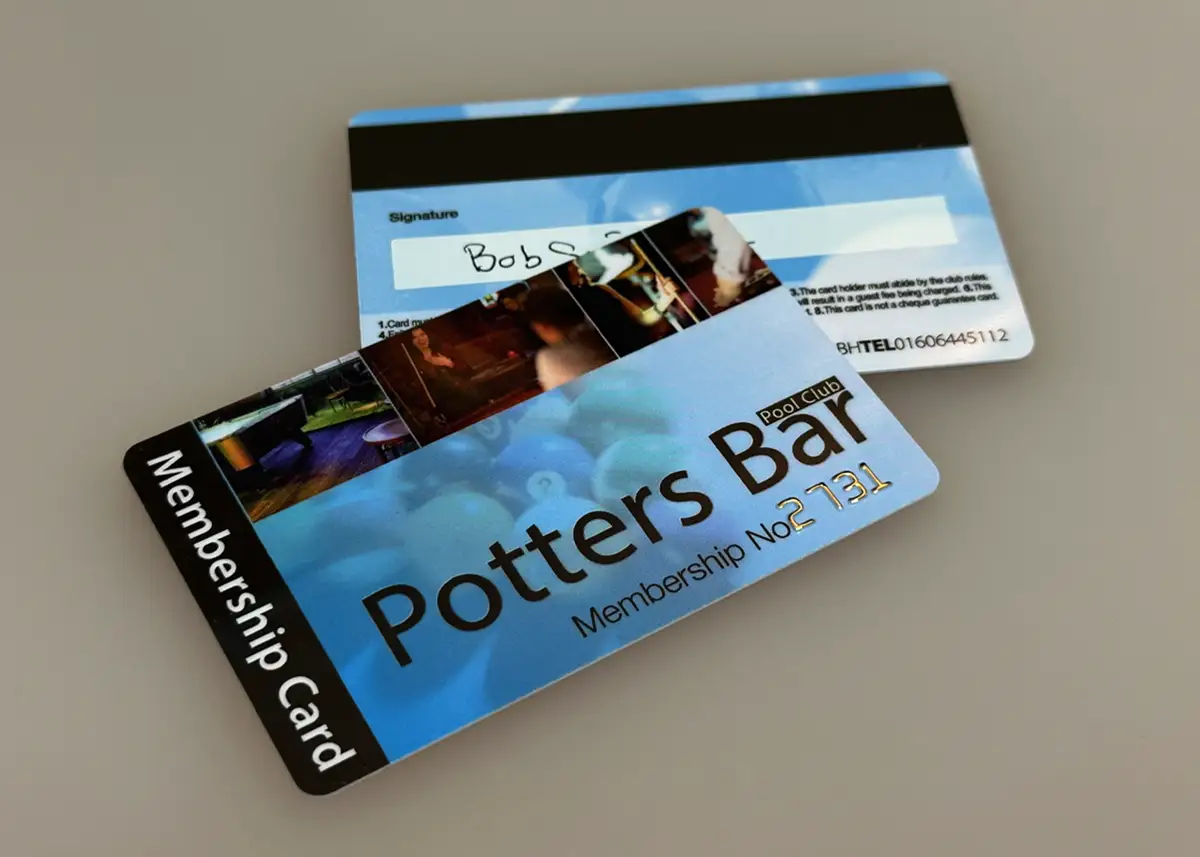
The short versionMembership, loyalty or gift cards: you send one design, plus a spreadsheet with a row for each card. Names, numbers, barcodes, QR codes, dates and levels can change from card to card; a printed photo can’t. On our full colour PVC cards, details printed with your order are sealed under clear PVC with the design. Don’t know the names yet? We can hold your printed cards and print each name onto a finished card as people join.
What can be different on each card?
Anything that’s text or a code. Each detail that changes gets a column in your spreadsheet and each card gets a row, so you can combine them: a name and number on the front, say, and the same number as a barcode on the back.
| Detail | Example | Worth knowing |
|---|---|---|
| Name | Priya Shah | Printed as it’s typed in your file, capitals and all. |
| Membership or account number | 004127 | From your file, or give us a start number and the cards count on from it. |
| Barcode | The membership number, as a barcode | Code39 is the most popular; Code128 and EAN5 are also available. |
| QR code | A different web address on each card | We recommend at least 15mm square. It can hold a number or a link. |
| Expiry date | 31/03/2027 | For memberships that start at different times of year. |
| Membership level | Full, Junior or Senior | Or give each level its own card colour. |
| Magnetic strip | The membership number, encoded | Encoded from your file, or left blank for you to encode. Cards with a strip are 760 microns thick. |
The one thing we can’t do is print a different photo on each card: see photos for the alternatives.
Print only what the card needs. A name and number are fine, but a home address or date of birth on a card that might be lost is personal data you’re responsible for under UK GDPR. Our guide to what to put on a membership card goes through each detail.
How do you put names on plastic cards?
You send one design and one spreadsheet. Each row of the spreadsheet becomes one card: the design is the same on every card, and the details in the row are printed into the space you’ve left for them.
| Row | A | B | C | D |
|---|---|---|---|---|
| 1 | Name | Member no. | Level | Expires |
| 2 | Priya Shah | 004127 | Full | 31/03/2027 |
| 3 | Tom Hughes | 004128 | Junior | 30/04/2027 |
| 4 | Margaret O'Neill | 004129 | Senior | 31/05/2027 |
- SendEmail your artwork and your spreadsheet. No artwork yet? Our design service is £29 +vat.
- CheckWe email you a free proof showing where the names and numbers sit.
- ApproveApprove the proof in writing and pay. Nothing is printed until you have.
- PrintPrinted in 7 working days, counted from approval, payment and a file that meets our specification.
On our full colour PVC cards, names, numbers and barcodes are printed at the same time as your design and sealed under clear PVC with it, so they can’t scratch or wear off. A barcode that scans on the first day still scans after years in a wallet: our guide to how long plastic cards last explains why.
Need them sooner? Express production takes 3 to 4 working days: ask us for cost and availability.
Printed, embossed or added later: which suits you?
There are three ways to put a name on a card. Print it with your order when you have every name, emboss it for raised characters like a bank card, or have us add it later as people join.
Silver Birch Tennis Club and its members are made up.
| The details | Ink | Lettering | Where | How many | |
|---|---|---|---|---|---|
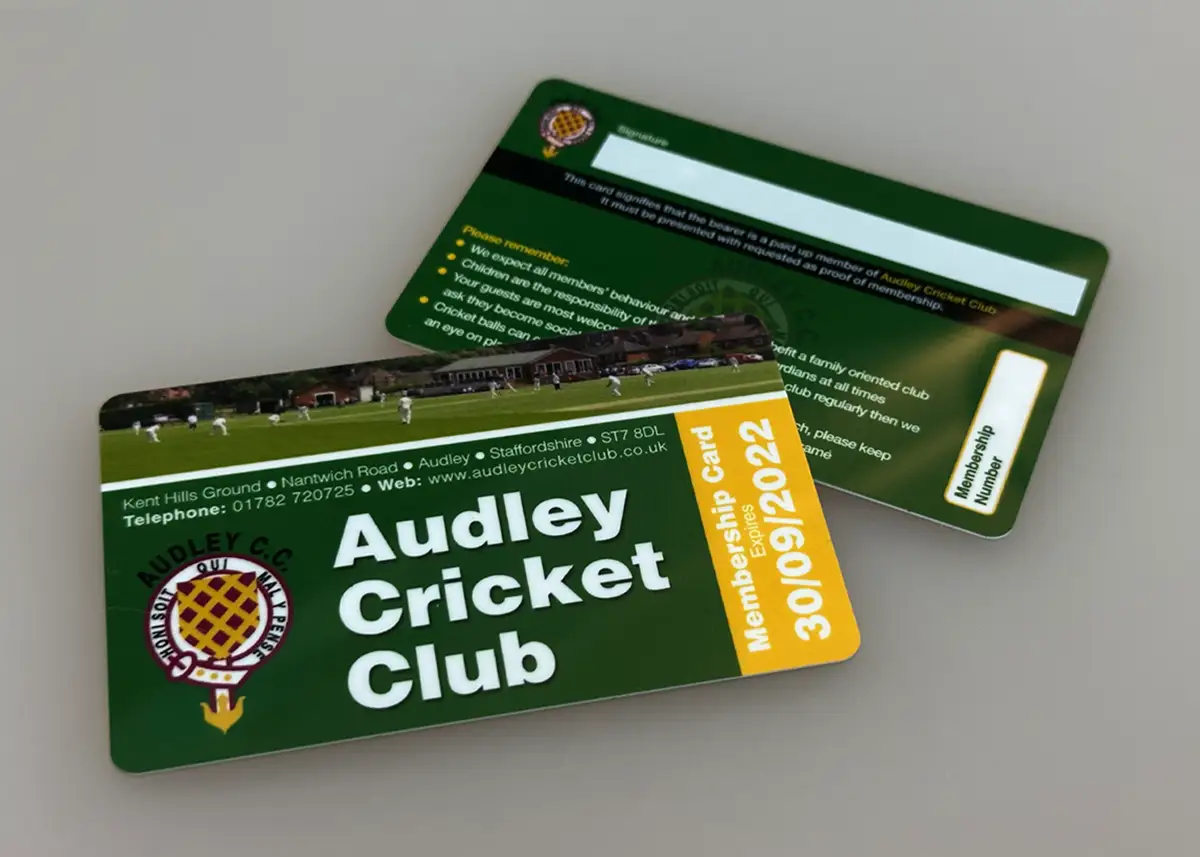
| Printed with your order | Your spreadsheet or a start number, with the order | Any CMYK colour, such as one from your logo | Normally Arial or Times New Roman, at any size from 6pt | Anywhere, front or back, sealed under clear PVC | The whole order, from 25 cards |
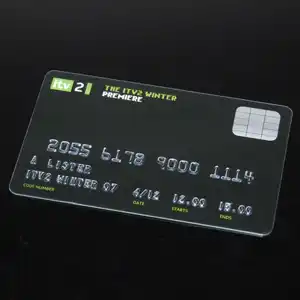
| Embossed | Your spreadsheet or a start number, with the order | Black, metallic silver or metallic gold | Raised, 5mm or 3mm tall: up to 22 characters a line at 5mm, 27 at 3mm, counting spaces | The bottom half of one side. It shows through on the other | The whole order, from 25 cards |
| Added later | An Excel file, whenever people join | One colour: black, white, metallic gold or metallic silver | A font from our range | One side, printed onto the surface of a finished card from your stock | Stock printed from 25 cards, then no minimum call-off: one card or thousands at a time |
Which way suits you?
- A name or number on every card?
- Is it only a number, counting up from a start?If yes: Sequential numberingGive us a start number, such as 0001
- If not: Do you have every name when you order?If yes: Printed with your orderFrom your spreadsheet. Or embossed, for raised letters
- If not: Will you send names as people join?If yes: Bureau personalisationWe hold your cards and add each name
- If not: Write-on panelsPrinted cards you fill in by hand
Write-on panels suit a small club: each card has a panel added on top of the print, which takes an ordinary ballpoint pen (see writing on plastic cards). Embossing isn’t available on 420 micron cards; our embossing page has the full details.
Can names be added later, as members join?
Yes, with our bureau personalisation service. Your cards are printed in one run and we hold them for you. Whenever people join, you email an Excel file with their details, and they’re printed onto cards from your stock and posted to you.
- More than a name. A membership number, account number, level or expiry date can go in the file too, printed onto one side of the finished card.
- One ink colour: black, white, metallic gold or metallic silver, in a font from our range. See the fonts and ink colours.
- Allow 3 working days. If your file reaches us before 1pm, we strive to send the cards the same day.
- No minimum call-off. Your stock is printed as one order, from 25 cards; after that, call off one card or thousands at a time.
- Names you already have can go with the first order. Those cards are sent when the order is printed, and the rest are held for you.
- The cards come to you, or to someone you name at your organisation. We can’t post them to your members.
- Stock is held for a year. After that, we post you whatever’s left, or quote for a further 12 months.
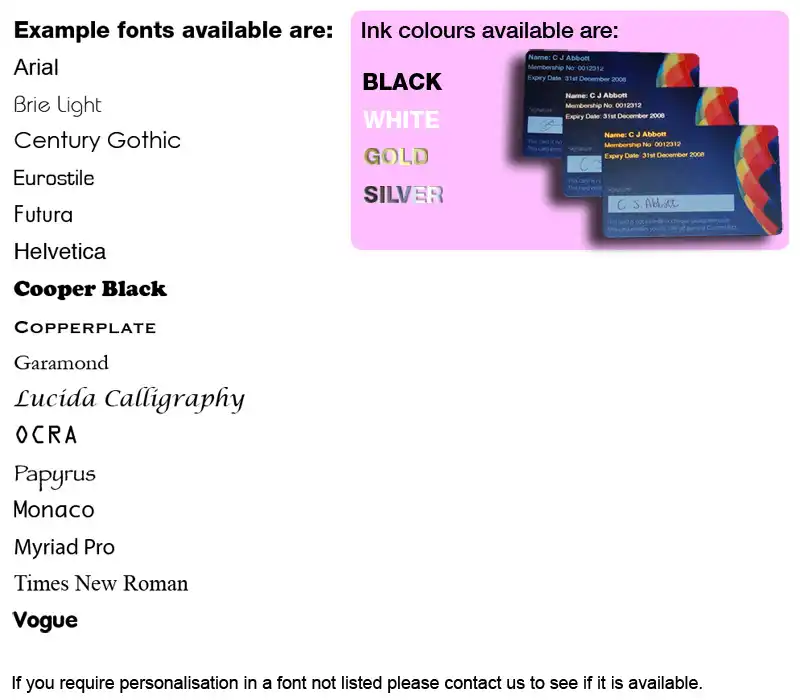
The bureau service is quoted as one inclusive price. The only extra is postage and packing on each file you send, not each card, covered by a balance you keep on your account.
Adding names to cards that are already printed is sometimes called overprinting. Our bureau service does it for the cards we supply and hold for you, printing each name onto the surface of the finished card. If you want names sealed in under clear PVC, send them with your order. The file rules and postage rates are on the bureau personalisation page.
How do I send the names?
In an Excel file attached to an email: one row for each card, one column for each detail that changes, and headings in row 1. We don’t edit customers’ data files, so everything in the file is printed as it is, and the file should hold nothing else. Here’s a short file set up two ways.
| Row | A | B | C | D |
|---|---|---|---|---|
| 1 | Name | Member no. | Expires | Paid? 5 |
| 2 | Priya Shah | 4127 1 | 31/03/2027 | Yes |
| 3 | tom hughes 2 | 004128 | 30/04/2027 | Yes |
| 4 | 3 | |||
| 5 | Margaret O'Neill | 004129 | TBC 4 | No |
| Row | A | B | C |
|---|---|---|---|
| 1 | Name | Member no. | Expires |
| 2 | Priya Shah | 004127 | 31/03/2027 |
| 3 | Tom Hughes | 004128 | 30/04/2027 |
| 4 | Margaret O'Neill | 004129 | 31/05/2027 |
- The zeros have gone: the column wasn’t formatted as Text before the numbers went in.
- A name in small letters, which would be printed that way.
- A blank row, which would be printed as a card with no name on it.
- “TBC” instead of a date, which would be printed as typed.
- A column for your own records. Keep it in your copy, not the one you send.
- Format every column as Text before you type or paste anything in. Otherwise Excel drops zeros from the start of a number and can change long numbers and dates, and formatting the column afterwards won’t bring them back. Our guide to stopping Excel changing your numbers shows how in Excel, Google Sheets and Numbers.
- Type each name exactly as it should print, with its capitals, hyphens, apostrophes and accents.
- No formulas, and no hidden or blank rows or columns. A formula is printed as the formula, so copy the column and use Paste Special › Values. Keep everything on one worksheet in one file.
- The same columns, in the same order, every time, attached to an email even for one card. With the bureau service, a file laid out differently can waste cards from your stock, and a file can’t be recalled once it’s sent.
Our Excel file guidelines include an example file to download. If a number appears on the card and in a barcode, give each its own column: numbered plastic cards shows how to keep the two in step.
Where should the names go on the card?
In a space you leave clear for them in the design, with strong contrast behind them and room for the longest name on your list.
- A clear space. Printed names and numbers can go anywhere on the card, front or back, so leave a space for them in the design rather than printing them over a busy photo.
- Dark on light. A pale panel behind dark text reads at a glance. On a dark card, white stands out, or metallic gold or silver for names added later or embossed.
- The name at 10 to 14pt. Size the space for the longest name on your list, not the average one: a space that suits “Tom Hughes” may be too short for a long double-barrelled name.
- The number at 10pt or more, so it can be read in a second, and typed in if a scanner fails.
- Inside the safe area. Keep every name and number at least 3mm inside the edge of the card.
Nothing on a card should be smaller than 6pt: our guide to font size on plastic cards suggests a size for each part of the card. Put a barcode on a white box with its number printed underneath, and keep anything important on the back clear of embossing, which shows through.
What should you check on the proof?
The layout of the names and numbers: where they sit, their font and size, and how the numbers are formatted. Every order comes with a free email proof showing where the personalisation sits on your card, so you can check the layout and wording. The colours on the proof are a guide only, because every screen shows colour differently.
- Where the personalisation sits, and which side of the card it’s on.
- The font and size of the names and numbers.
- The number format: zeros at the start, prefixes and spaces, as you want them.
- The barcode type, and that the number printed under it is the number it should carry.
Check each name and number in your file before you send it. Our free artwork check covers bleed, resolution, colour mode and file set-up, not wording, and we don’t edit data files, so a misspelt name is printed as it is. So is a name you send to the bureau service later.
We can’t test a barcode, QR code or magnetic strip on your own system. If one has to work with your till or door reader, or a colour has to be right, add a postal proof to your order: a few real cards posted to you before the rest are printed. It costs £65 +vat, takes around 5 working days and is for full colour cards.
When the cards arrive, check them straight away. Our terms ask you to tell us in writing within 24 hours of delivery if any personalisation is missing or wrong.
Can each card have the person’s photo?
Not printed on the card: we can’t print a different photo on each card. A photo can still go on each member’s card, or be a scan away.
- Photoseals. A self-adhesive photoseal fixes a passport-sized photo to the card. It’s easy to apply at the desk when someone joins (our photoseals page has a short video), or we can attach them for you. Partly attaching one before the member arrives makes joining quicker.
- A QR code to the member’s online record. Each card’s QR code can carry its own web address from your spreadsheet, and the photo lives on the record it opens.
- A photo in your membership software, if it can show one on screen when the card is scanned.
If every card must carry its own printed photo, a desktop ID card printer is the right tool, and many organisations use one alongside printed cards. Our guide to ID card printers or printed cards compares the costs.
Which cards can be personalised?
All our full colour cards, including RFID cards, event passes, key tags and combo cards, and the eco materials too. What differs is what can go on each, and whether the print is sealed.
| Card | What can change | Worth knowing |
|---|---|---|
| Membership, loyalty and gift cards | Names, numbers, barcodes, QR codes, dates, levels and magnetic strips | Standard PVC, 760 microns. Details printed with your order are sealed under clear PVC |
| RFID cards | Names, numbers and barcodes, printed on the outside | The chip is supplied unencoded: your own system encodes it |
| Event passes | A name, pass number, zone or expiry date on each pass | 680 microns |
| Key tags | A number, barcode or QR code | 54 x 29mm, 760 microns. Magnetic strips aren’t available |
| Combo cards | A number, barcode or QR code | The card and its snap-off key tag carry the same one. 680 microns |
| Recycled PVC and biodegradable | Names, numbers, barcodes and QR codes, and names added later by our bureau service | Details printed with your order are sealed under the surface, as on standard PVC |
| EcoTough and Plastic-Free Board | Names, numbers, barcodes and QR codes | The print isn’t sealed under clear PVC, and magnetic strips aren’t available |
Personalised membership, loyalty and gift cards
A membership card usually carries the member’s name, number and expiry date. A loyalty card scanned at the till needs its own number, as a barcode or QR code, and a combo card repeats it on a snap-off key tag. A gift card can carry its own code, hidden under a scratch-off panel.
Personalised RFID cards
An RFID card is personalised on the outside like any other: a name, number or barcode printed on each card from your file. The chip inside is supplied unencoded, and your own access control system encodes it; if it writes a number to the chip, the number printed on the card can match. We supply Mifare Classic 1K (the standard for most door entry and gym systems), Mifare DESFire, HID and lower-cost Fudan chips. Not sure which you need? Send us your reader’s make and model, or a photo of a card, and we can usually identify the chip. See what an RFID card is, or plastic cards for gyms.
What do personalised cards cost, and how do you order?
Personalisation is an optional extra, priced in your quote with the cards. The cards themselves start at £75.00 +vat for 25 full colour cards.
| Quantity | Price | Per card |
|---|---|---|
| 25 cards | £75.00 +vat | £3.00 |
| 50 cards | £79.00 +vat | £1.58 |
| 100 cards | £85.00 +vat | 85p |
| 200 cards | £99.00 +vat | 49.5p |
| 250 cards | £109.00 +vat | 43.6p |
| 500 cards | £175.00 +vat | 35p |
| 1,000 cards | £245.00 +vat | 24.5p |
Full colour on both sides, High Gloss, 86 x 54mm and 760 microns thick, printed from your print-ready artwork. Prices exclude VAT and optional extras such as personalisation.
RFID cards with a Mifare 1K chip start at £182.00 +vat for 25.
What to send for a quote
- The card and the quantity. Our minimum order is 25 cards.
- What changes from card to card, and the barcode type your system reads, if there’s a barcode.
- For a magnetic strip, HiCo or LoCo, which tracks to encode and what goes on each.
- Whether you have every name now, or want the bureau service.
- Your artwork, or your logo and wording for our £29 +vat design service.
Email it to sales@cpcards.co.uk or use our quote form. We aim to reply within about 10 minutes, 9am to 5pm, Monday to Friday.
Wherever you are in the UK
We work by email, so it makes no difference whether you’re in Birmingham, Manchester, Southampton or Kent: there’s no need to visit us. Delivery to mainland England is free, whatever the quantity; our delivery prices list the areas that are charged. We’ve worked with the same printer in England for over 20 years, and we look after your order from start to finish. Our customers have left over 240 Google reviews.
Questions & Answers
-
Do you supply personalised membership cards for clubs?
Yes. Each member’s card can carry their name, membership number, level and expiry date, printed from your spreadsheet with the club’s design, from 25 cards. If members join through the season, our bureau service holds your printed cards and adds each new member’s details when you email an Excel file.
-
Can each personalised loyalty card have its own barcode?
Yes. Each card can carry its own number as a barcode, from your spreadsheet or counting on from a start number. Tell us the barcode type your till reads: Code39 is the most popular, and Code128 and EAN5 are also available. A postal proof, for £65 +vat, lets you scan real cards on your own till first.
-
Can each personalised gift card have its own code?
Yes. Send the codes in an Excel or CSV file, one row per card, and each card is printed with its own. A code can be hidden under a scratch-off panel, with a serial number printed where it can be seen: our guide to gift card codes in Excel or CSV shows how to lay out the file.
-
Can RFID cards be personalised?
Yes. A name, number or barcode can be printed on each RFID card from your spreadsheet. The chips are supplied unencoded, so your own access control system encodes them, and the number printed on the card can match the one your system writes to the chip.
-
What’s the minimum order for personalised cards?
Our minimum order is 25 cards, and every card in it can carry different details. With our bureau service, your stock is printed as one order, from 25 cards. After that there’s no minimum call-off: even one new member can go in an Excel file.
-
Does personalisation cost extra?
Yes. It’s an optional extra, priced in your quote with the cards. Tell us the quantity and what changes from card to card, and we’ll reply by email, usually within about 10 minutes, 9am to 5pm, Monday to Friday. Bureau personalisation is quoted as one price, plus postage and packing for each file you send.
-
Do you check the spelling of the names?
No. Our artwork check is technical (bleed, resolution, colour mode and file set-up), and we don’t edit customers’ data files, so each name is printed as it is in your file. Check every name in your file before you send it, and the layout on your proof before you approve it.
-
Do you personalise plastic cards for customers in Birmingham or Manchester?
Yes. We supply customers all over the UK by email, so there’s no need to visit a local printer. Delivery to mainland England is free, whatever the quantity, and you approve a free proof by email before anything is printed.
Ready to order personalised cards?

Email your design and your spreadsheet to sales@cpcards.co.uk, or tell us what you need and we’ll quote first. Everything is agreed in writing, and you approve a free proof before anything is printed.
We aim to reply within 10 minutes, 9am to 5pm, Monday to Friday.